
 ®
Features
Everything between “a list of company names” and “a meeting in the calendar”
salesotto is not a card index with an AI button. It takes on the work that actually eats time in sales — research, prioritisation, writing, documentation.

01
Projects: your target picture as configuration
A project captures what you sell, to whom and in which markets. From it come the ideal customer profile, scoring model, pipeline stages and the tone of your outreach. Several offerings, audiences or mandates run in parallel, cleanly separated but in one contact database.
- Offering, audience, region and language per project
- Custom pipeline stages and scoring models
- Team and owners per project, permissions included
What it saves you: No customising project, no parallel world per audience.
02
Company research and enrichment
salesotto reads websites, imprints, press and open sources and fills in the company profile: segment, size, revenue, locations, management, notable facts. The profile can be refreshed with one click — nobody types fields.
- Company profile and master data filled automatically
- Group hierarchies: parent, country organisations, sites
- Source and timestamp on every record
What it saves you: A list of names becomes a working basis overnight.
03
Buying signals
Every night salesotto checks public sources for the companies in your pipelines, opportunities and watchlist: leadership changes, expansion, funding, tenders, partnerships. Each signal is stored with its source, assessed per project and given a hook. Signals feed first outreach, follow-ups and briefings.
- Signal profile per project: which events count, what is background
- Assessment per project with a recommendation: mail draft, next step or task
- Visible on company, opportunity, start page and in the cockpit; people changes as contact suggestions
What it saves you: Reading through Google Alerts every day.
04
Scoring per project
Your ideal customer profile becomes a model: criteria, weights, disqualifiers, classes A to D. Every company gets a rating with a reason per criterion — so you see immediately where effort pays off.
- Model configurable per project, changes take effect immediately
- AI rating with reasoning, manually overridable
- Disqualifiers keep time-wasters out of the pipeline
What it saves you: Prioritisation by criteria instead of gut feel.
05
Contact and decision maker research
salesotto looks for the roles that decide on your offering — engineering, production, procurement, management —, creates them as contacts and records source and verification status. Internally it suggests who belongs in CC.
- Buying center roles instead of a generic address
- Warm/cold status: prior contact changes the approach
- One address book across projects, without duplicates
What it saves you: No more evenings on LinkedIn asking “who is responsible here?”.
06
Prospecting pipelines
Board, list and outreach overview on the same data. Each card shows how often you reached out, what came back and when the next step is due. Overdue is red — that's all the status report you need.
- Several pipelines per project, stages freely definable
- Touch counter: 1st, 2nd, 3rd outreach at a glance
- Focus mode for working through instead of clicking around
What it saves you: The spreadsheet you'd otherwise keep on the side.
07
AI outreach: first, second, follow-up
salesotto doesn't write mass mail. The AI uses the company profile, current triggers, your offering, the history so far and the recipient's language — and drafts first outreach, a nudge or a post-meeting follow-up. You review, edit, send.
- German or English, tone per project
- Second and third outreach with a new angle instead of “just checking in”
- Nothing goes out without your approval
What it saves you: The half hour a good personal email otherwise costs.
08
Mailbox connection and direct sending
Outlook connects via Microsoft Graph. Outgoing mails are sent from the system or land as drafts in your mailbox, incoming replies flow back into the CRM automatically — linked to contact, company and project. You also see a delivery status per mail (delivered or bounced) — consent-free, without tracking pixels on the recipient side.
- Two-way sync including thread attribution
- Signature, attachments and CC as usual
- Several mailboxes, cleanly separated per workspace
What it saves you: All the manual logging.

09
Follow-ups with memory
The Mails area shows what is waiting for you: unanswered, answered, hidden. Read and reply in one view, schedule a meeting from the mail with a calendar look. On the opportunity, one button finds the right thread and drafts the follow-up to match the stage. Out-of-office and auto replies don't count as answers.
- Follow up per person when several contacts of one company were addressed
- Delivery status without tracking pixels, resend bounced mails with a corrected address
- Calls and mails are linked to the opportunity, visible on company and deal
What it saves you: Searching the inbox for who hasn't replied yet.
10
Start page: your day at a glance
After login, salesotto greets you with what matters today: meetings with a briefing button, due steps, open replies, new buying signals and suggestion cards with reasons. No scrolling, one screen, on mobile too.
- Today and the next three days, past meetings with a debrief prompt
- Suggestions like “buying signal fits the open opportunity” with a jump to the target
- Browser time zone, day boundaries stay correct on the road
What it saves you: The morning click-through across five areas.
11
Work queue with suggestions
One queue for the day: due next steps, overdue contacts, your own tasks and system suggestions — each with a reason. Finished items disappear, new ones move up.
- Rules detect stalls, open replies and due cadences
- Tasks attach to company, contact or opportunity
- Team view: what sits with whom
What it saves you: The question “where do I start today?”.
12
Opportunities, quotes, debriefs
When interest becomes a project, it moves into the opportunity: stage path, value, probability, qualification (situation, need), meetings, offers and update history. Follow up with one button, the company's buying signals in their own tab, transcripts and calls in the timeline.
- Stage checklists show what's missing in this phase
- Quotes as documents with value, date and status
- Structured loss reasons — analysable instead of free text
What it saves you: Writing the meeting notes.
13
Prepare and debrief meetings
Before the meeting salesotto generates a briefing from everything the CRM knows: pipeline and deal status with offers, recent communication, participants with dossiers, the company's buying signals. Afterwards, transcript, dictation or note become the debrief: summary, opportunities, tasks, mails. Phone calls are logged in seconds.
- Briefing in six fixed sections, stored on the meeting, reachable from company and deal
- Debrief with Fireflies transcript or upload, tick-off without AI for short meetings
- Log a call: dictation, summary, tasks, update on the deal
What it saves you: Half an hour of preparation and the minutes afterwards.
14
Products & offers
Products and services live in a catalog with descriptions and prices. Build offers with line items, discounts and validity — or tell the AI in one sentence what to include and review the draft in the live preview. One click produces the official PDF with your logo, stationery, optional cover page and your terms and conditions.
- Offer PDF with logo, cover page and terms — from your own stationery
- AI drafts from your product catalog and a short brief, you review the preview
- Numbering, versions, status — the opportunity value follows the latest offer
What it saves you: Copying Word templates and calculating totals by hand.
15
Reporting without a reporting evening
Because every activity is captured anyway, reporting happens on the side: weekly report, management report as a PDF with your logo, KPIs per project, team or region — at the click of a button, even straight as an email to your distribution list. The velocity view additionally shows how fast your funnel really is: days per step, compared to the previous period.
- Last step / next step per company and opportunity
- PDF with logo, internal or client-facing
- Sent to fixed recipients, text pre-drafted by the AI
What it saves you: Your Friday afternoon.
16
salesotto as a command line
Instead of clicking, you ask: “What's still missing in my project?”, “Which replies are open?”, “Prepare the meeting with LHIND” and let salesotto log calls, follow up on deals or tick off meetings, each with confirmation.
- Questions in plain language, answers with links into the system, a guide for every setting
- Log calls, follow up, briefing, tick-off, pipeline intake, scoring, offers on request, with a confirmation click
- Never sends, never deletes: safety net and audit trail included
What it saves you: Hunting for the right menu item.
17
Dashboard and key figures
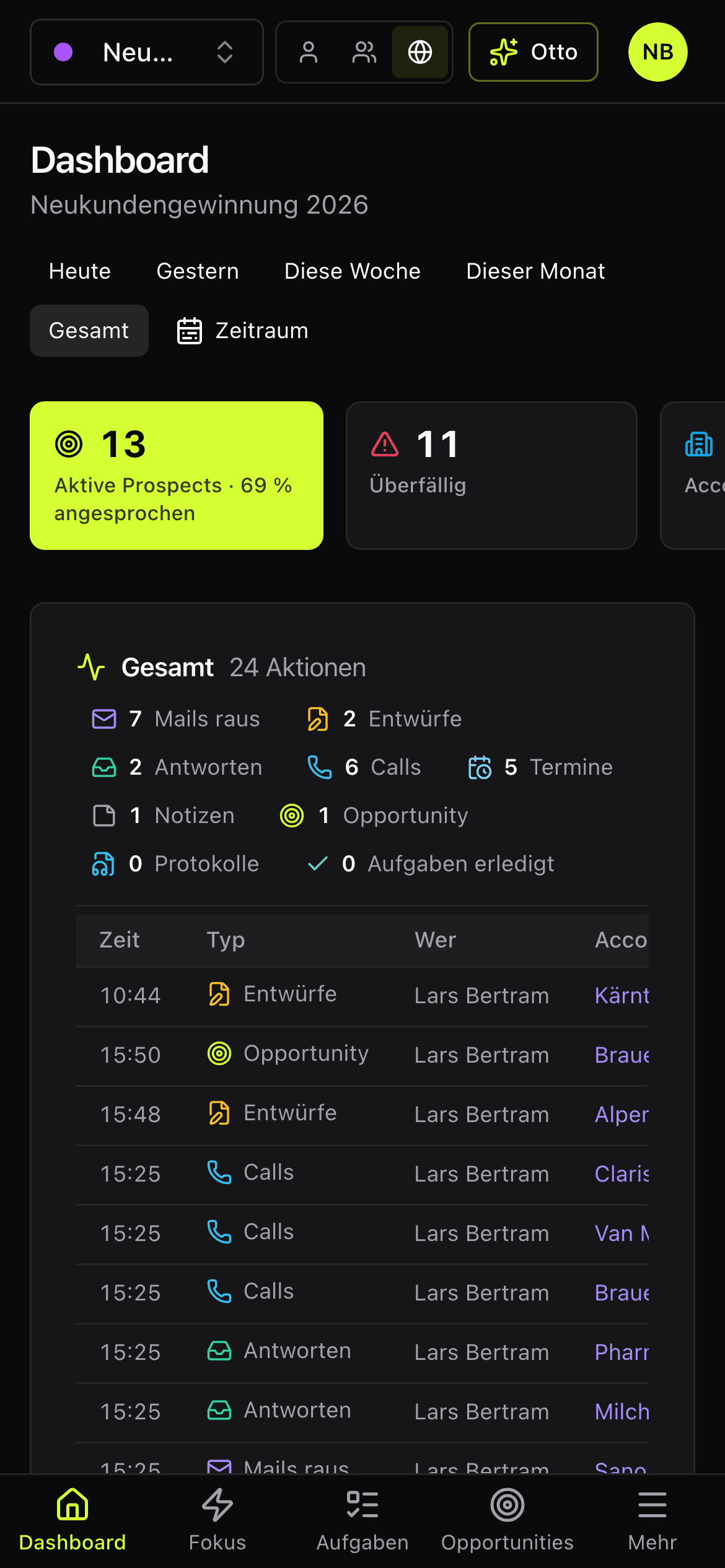
One dashboard per project with four views: focus today (what is due, who is waiting for a reply), prospecting funnel with progress in percent, opportunities with weighted pipeline and outreach overview. A period switch (today, week, month, custom) filters all flow numbers; every tile explains itself via tooltip.
- Today's focus: due next steps, overdue contacts, who is waiting for a reply
- Open opportunities with total, stage and weighted pipeline
- Outreach overview: who was contacted, who replied
What it saves you: The status round before the sales meeting.
18
Mobile and bilingual
Every desktop feature is also available on mobile — with dedicated views built for the phone: what is due today, focus mode, tasks, opportunities, even the offer editor. Interface and AI texts in German or English, switchable at runtime.
- Dedicated mobile navigation instead of a squeezed desktop view
- Language switch for interface and content
- Dictate instead of type, right after the meeting
What it saves you: Carrying the laptop on the train.

Rather see it than read it?
In the demo we walk through exactly the features that matter for your sales team — on your use case, not on a sample account.
or write to info@becoss.de
And also
Workspaces, teams, permissions
Several companies in one platform, org chart, internal contacts, roles from super admin to project member.
Import instead of typing
Upload any CSV structure: the AI maps the columns, you review every row, duplicates are detected. Companies, contacts, internal staff and price lists. Every run can be undone.
Documents on the record
Quotes, decks and contracts attach to company, contact or opportunity instead of living in email.
Audit trail
Who changed what and when — including everything the AI did.
GDPR built in
EU hosting in Frankfurt, data processing agreement, export and disclosure on demand.
AI provider of your choice
Anthropic by default, optionally OpenAI, Mistral (EU), Azure OpenAI or Claude via Azure with your own key (BYOK). Or AI included through us.
Discreet mode
Hide amounts and company names app-wide, by click or shortcut. For demos, screenshots and screen sharing.
Enterprise security
Two-factor per user, enforced per tenant, Microsoft sign-in, logged support access with approval, retention periods, audit export and SIEM webhook.
Products and entities
Product catalogue per tenant, assignment per project, inactive products stay in the history. Local entities with their own number range as offer senders.

Twenty minutes of demo beat any feature list
We'll show salesotto on your own use case: your audience, your offering, your first outreach.
EU hosting (Frankfurt) · GDPR-compliant · Access by invitation